Choose Dishonored mods and their required installers
A power change, a saved game and a ReShade preset do different jobs. Choose the game you will launch, then check the selected mod's requirements before changing its files. A familiar installer name alone does not tell you whether a mod fits your game or version.
Start with your game
The mod directory separates Dishonored, Dishonored 2 and Death of the Outsider. For the story expansions, keep Dishonored selected and check the listing for The Knife of Dunwall or The Brigmore Witches requirements. A listed add-on is a requirement, not a suggestion to switch to another game.
Dishonored Base Game New Game Plus by Chikawowwow contains saved games. ENB or Reshade with SweetFX for Dishonored by Carinth changes the picture. Neither is a substitute for a gameplay mod's named installer. When no requirement is listed, compatibility is still unconfirmed; check the author's instructions for the version and files you have.
For an unmodified power’s mana cost and upgrades, use its game-specific entry, such as Dishonored 2’s  Blink.
Follow a powers mod's requirement
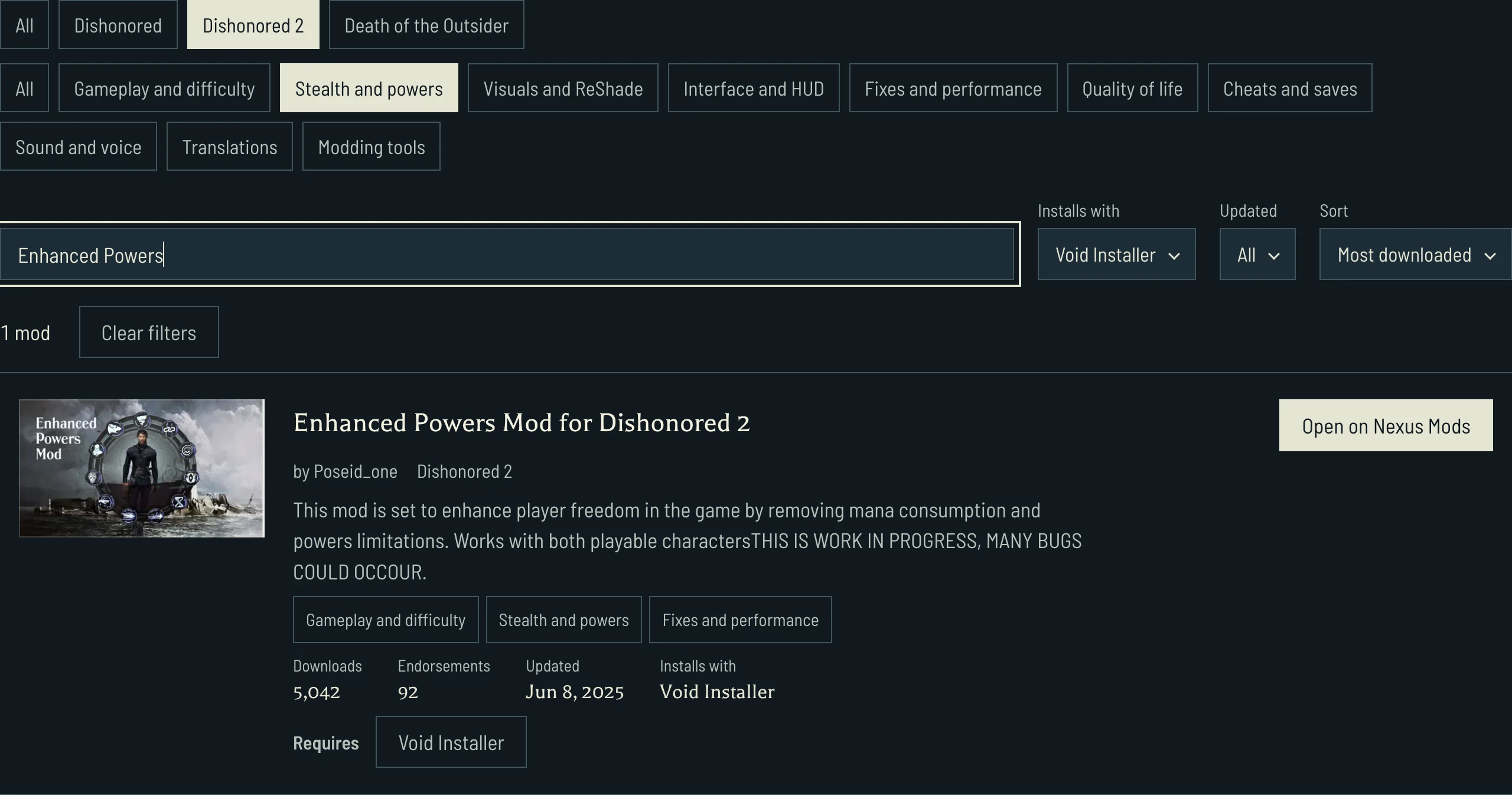
Open Dishonored 2 stealth and powers mods using Void Installer. The selected game, goal and installer narrow the list together. Changing the sort changes their order, not the chosen game or installer.
Enhanced Powers Mod for Dishonored 2 by Poseid_one describes changes to mana consumption and power limits, and its summary warns that bugs may occur. Its Requires link opens Void Installer. Follow that requirement before deciding which files to use; the shared installer does not make two mods compatible with each other.
Search for Enhanced Powers within those filters to find the example below.
Check the installer and its dependents
Void Installer by FCH823 names Dishonored 2 and Death of the Outsider in its summary and lists .NET runtime 6 as a requirement. Its Required by list shows mods that name it. Both games can appear there, so check the game on each row before opening it.
TFC Installer (OBSOLETE) retains that warning in its title. Treat an old dependency as a reason to read the author's current instructions, not as blanket installation advice. When Installs with is Not stated, the missing label does not mean that no installer is needed.
Most downloaded and Most endorsed order the published figures. Recently updated and the date filters use the listing's update date. Neither popularity nor a recent date answers whether the files match your game, save or other mods.
Read the author's files before installing
Open on Nexus Mods asks whether to open nexusmods.com in a new tab. Decline keeps the list open; Yes opens the chosen author's page. Read its file choices, installation steps and game-version limits there before changing anything. Following a requirement or opening that page does not download or install a mod.