Save and share Dishonored power and bonecharm builds
You can use the planners without signing in. Each character and campaign keeps its own rune selection. Each crafting game keeps its own bonecharm in this browser. An account adds a way to save those plans for another browser; it is not a requirement for using the tools.
Opening a tool and loading a shared plan are different
Emily's rune planner and the Dishonored 2 forge open those scopes without replacing their existing choices.
A share address can also contain the actual power selection or traits. Opening that address replaces the corresponding scope. It leaves other characters and crafting games alone. Read the rune and crafting guides for their specific rules.
Move a plan to your account deliberately
After sign-in, rune plans in this browser with selections beyond the campaign's starting powers are copied automatically into account scopes that have no saved or removed record. Different account plans are left for comparison. The browser copy stays, and failed writes retry on a later page.
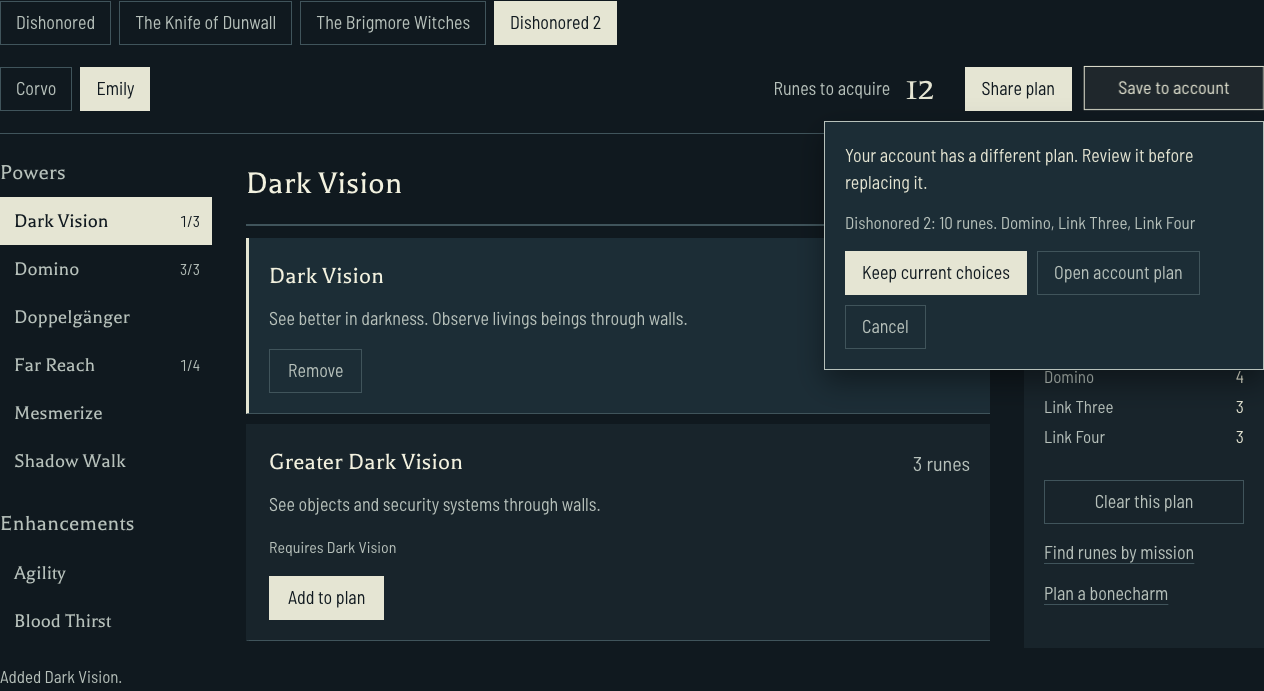
Saving from the planner first compares the account copy with your current choices. When they differ, Keep current choices writes the browser plan; Open account plan opens the saved selection. Cancel leaves both alone.
Open your account and choose an available sign-in option. The account view lets you compare browser plans with account copies. Saving sends the plan you selected, not every unrelated campaign. Loading an account plan writes that scope back into this browser and keeps the other scopes untouched.
When the account view shows different copies, Update account keeps the browser selection. Use account plan loads the saved selection into that scope. An account change during a save refreshes the comparison and asks you to choose again, using Keep browser version rather than silently overwriting.
A rejected or failed save leaves the browser plan intact. Retry from the account view rather than reconstructing the build. Removing a plan from the account asks for confirmation and retains the copy in this browser.
What is covered by account saves?
Rune selections, crafted bonecharms and power tier lists can be saved. Chaos rules, safe combinations and upgrade requirements are references rather than account plans. A saved plan must match its game's valid choices: missing power prerequisites or traits from another game are rejected instead of being accepted as a different run.
Saving a plan keeps it private. Publishing a saved plan as a public build is a separate action in your account.
If browser storage is unavailable, keep the current share address before leaving. A plan still visible on screen is not automatically a durable browser save. After signing in on another browser, load the desired account version before continuing to change it.